How to Track Sauna on Apple Watch (There's No Built-In Workout)
Sauna Assistant App
A real sauna session on your wrist
Rounds, heart rate, and cold plunges tracked properly - then saved to Apple Health. No custom workout hacks needed.

Pay once. No subscription.
Short answer: no, Apple Watch does not have a built-in sauna workout. Apple’s Workout app ships around 80 activity types - from Archery to Wrestling - and Sauna is not one of them. There is no Sauna setting, no sauna mode, and nothing to enable in watchOS.
You can still track sauna on Apple Watch, though. There are three ways:
- Create a custom workout named Sauna under the Other activity type - free, built in, but the metrics it records are misleading
- Use a dedicated sauna app - tracks rounds and heart rate properly and writes accurate data to Apple Health
- Add a Mindful Minutes entry by hand in the Health app - accurate, but no heart rate and entirely manual
This guide walks through all three, what each one actually records, and which numbers are worth trusting.
In This Guide
- Does Apple Watch Have a Sauna Workout?
- Method 1: Create a Custom Sauna Workout
- What the Custom Workout Gets Wrong
- Method 2: Use a Dedicated Sauna App
- Method 3: Log It Manually in Health
- Which Method Should You Use?
- What’s Actually Worth Tracking
- Which Apple Watch Models Handle It
- Tracking Sauna on Sauna Assistant
- What About Garmin, Whoop and Oura?
- Frequently Asked Questions
Does Apple Watch Have a Sauna Workout?
No. Apple publishes the full list of Workout app activity types, and there is no Sauna entry. The closest categories are:
- Other - Apple’s documented catch-all for activities without a matching type
- Mind & Body - grouped with Yoga, Tai Chi, Pilates and Flexibility
- Cooldown - intended for post-exercise wind-down
None of these know anything about heat. Apple Watch has no ambient temperature sensor, so the watch cannot detect that you are in a sauna at all. Whatever you select, it is simply recording elapsed time and heart rate and applying an activity label you chose.
This matters more than it sounds, and it is the root of every accuracy problem below.
Method 1: Create a Custom Sauna Workout
This is the free, built-in route. You are not adding a real sauna type - you are renaming an Other workout so it shows up as “Sauna” in your history.
On your Apple Watch:
- Open the Workout app
- Scroll to the bottom of the workout list and tap + to show every workout type
- Turn the Digital Crown to Other
- Tap the … button on the Other tile
- Tap Custom, then tap +
- Tap Add, choose Work, and set the goal type to Time
- Set your round length - 12 to 15 minutes suits most people
- Tap New Custom Workout below Custom Title and type
Sauna - Tap Create Workout
The workout now appears in your Workout app list. Start it as you step in.
Note that Create Workout stays greyed out until you have added at least one work or recovery interval, which is where most people get stuck. Step 6 is not optional.
To build rounds into it, repeat step 6 and add alternating Work and Recovery blocks - for example 15 minutes work, 5 minutes recovery, repeated three times. The watch buzzes at each transition, which is the closest the stock app gets to a round timer.
Doing the same thing on iPhone
You can also build the custom workout in the Fitness app on iPhone and it syncs to the watch. The steps are the same in substance; the watch route is faster if you are already standing in the changing room.
What the Custom Workout Gets Wrong
The custom workout records a session, but three of its headline numbers are not trustworthy in a sauna.
Active calories are heavily overstated. Apple Watch estimates energy burn primarily from heart rate combined with movement. In a sauna your heart rate climbs sharply - often to 120-150 bpm - because your cardiovascular system is dumping heat, not because muscles are doing work. The watch reads elevated heart rate, assumes exertion, and credits you accordingly. A 20-minute sit can post calorie figures resembling a brisk run. Treat those numbers as noise.
Exercise and Move rings fill dishonestly. For the same reason, sauna time closes rings without corresponding physical work. If you use your rings as a training signal, sauna sessions logged as workouts will quietly corrupt that signal.
Heart rate recovery data gets skewed. This is the subtlest one and it bites people who sauna straight after training. Heart rate recovery - how fast your pulse drops after exertion - is one of the more meaningful cardiovascular markers Apple Watch collects. Walk from a workout into a 90°C room and your heart rate stays elevated for reasons that have nothing to do with fitness. Logged as one continuous session, it looks like poor recovery.
What the custom workout does record accurately: elapsed time and heart rate itself. Those two are genuinely useful. Everything derived from them is not.
Practical fix: if you use the custom workout route, end your gym workout before entering the sauna and start a separate Sauna workout. It keeps the recovery data on the training session clean, even if the calorie figure on the sauna entry stays fictional.
Method 2: Use a Dedicated Sauna App
A purpose-built sauna app solves the labeling problem at the source. Instead of pretending heat exposure is exercise, it records what a sauna session actually is.
The meaningful differences:
- Rounds, not one continuous block. A sauna session is heat, cool-down, repeat. Apps built for it track each round separately, so you can see how round three compared with round one.
- Mindful Minutes rather than Active Energy. Writing sauna time to Apple Health as mindfulness keeps your Move and Exercise data honest while still recording that the session happened.
- Heart rate captured per round. A figure for each round tells you far more than a single session-wide average.
- Cold plunge logged separately. Contrast therapy is two different physiological events. Recording them as one blurs both.
- Temperature and humidity, if you have a compatible sensor - the two variables that determine how hard a given session actually was.
The trade-off is straightforward: dedicated apps cost money, and you are adding an app to do something the watch nominally already does. Whether that is worth it depends on how much you care about the data being right.
Method 3: Log It Manually in Health
The unglamorous option, and for some people the correct one.
- Open the Health app on iPhone
- Tap the Health Categories icon at the bottom right, tap Mental Wellbeing, then tap Mindful Minutes
- Tap Add Data
- Set the date, start and end times
This records that the session happened, adds nothing false to your activity rings, and requires no app and no watch in the heat at all. If you would rather leave your watch in the locker - a reasonable choice given Apple’s temperature guidance - this is how you still keep a record.
What you lose: heart rate, rounds, and any automation. It is a logbook, not a tracker.
Which Method Should You Use?
| Custom workout | Dedicated app | Manual Health entry | |
|---|---|---|---|
| Cost | Free | Paid | Free |
| Session time | Yes | Yes | Yes, typed by hand |
| Live heart rate | Yes | Yes | No |
| Per-round breakdown | Rough, via intervals | Yes | No |
| Round timer with cues | Buzz only | Audio and haptic | No |
| Calorie accuracy | Poor | N/A - not claimed | N/A |
| Keeps activity rings honest | No | Depends on the app | Yes |
| Cold plunge tracked | No | Yes | No |
| Watch must be in the heat | Yes | Yes | No |
If you sauna occasionally and mostly want the session to exist in your history, the custom workout is fine - just ignore the calorie figure. If you sauna several times a week and want the data to mean something, the custom workout will actively mislead you over time.
What’s Actually Worth Tracking in a Sauna
Setting tools aside: which numbers repay the attention?
Heart rate, live. Useful for seeing how hard the heat is working you and for comparing rounds. Treat it as information, not a safety test: there is no heart rate at which a sauna is safe for everyone, and Apple Watch cannot tell you that you are overheating. If you feel dizzy, sick, faint, short of breath or just wrong, leave, whatever the number says.
Round count and round length. Progress in sauna practice looks like tolerating heat more comfortably, not sitting longer in one go. Tracked rounds show that; a single session total does not. Our guide to timing sauna rounds covers how long each round should run.
Heart rate recovery between rounds. You can compare how your pulse settles between rounds, but that alone cannot tell you whether you are ready for more heat.
Overnight HRV. The delayed payoff. Heart rate variability measured during sleep reflects how the session affected your nervous system. A session that pushed too hard often shows as suppressed HRV the next morning; a well-paced one frequently holds steady or improves. This is a trend, not a single reading - it only becomes visible across weeks.
Temperature and humidity. The same 80°C feels completely different at 10% and 40% relative humidity. Without them, comparing two sessions is guesswork. See our guide to sauna humidity for why the interaction matters.
Not worth tracking: calories, steps, and anything derived from assumed exertion.
Which Apple Watch Models Handle Sauna Heat?
Apple’s temperature guidance covers older models too. It applies to Series and SE models as groups, and explicitly to all Ultra models, including the first generation.
| Model family | Recommended ambient temperature during use | Storage |
|---|---|---|
| Apple Watch Ultra, all generations (Ultra, Ultra 2, Ultra 3, Ultra 4) | -20°C to 55°C while worn | -20°C to 45°C |
| Apple Watch Series, including Series 7, Series 8, Series 9, Series 10, Series 11 and Series 12 | 0°C to 35°C | -20°C to 45°C |
| Apple Watch SE, all generations (SE, SE 2, SE 3) | 0°C to 35°C | -20°C to 45°C |
These limits refer to the surrounding air, not the temperature of your wrist. A traditional sauna at 70-100°C exceeds both operating ranges. The absence of an Environmental Requirements section on an older product page does not remove Apple’s published guidance.
Apple also specifies a separate charging range of 0°C to 35°C for all Ultra models. Let a hot watch cool before charging; the storage range is not an operating or charging range.
For the full picture on heat tolerance, failure modes, Water Lock and warranty, see our companion guide: Apple Watch in the sauna - what actually breaks.
Tracking Sauna with Sauna Assistant
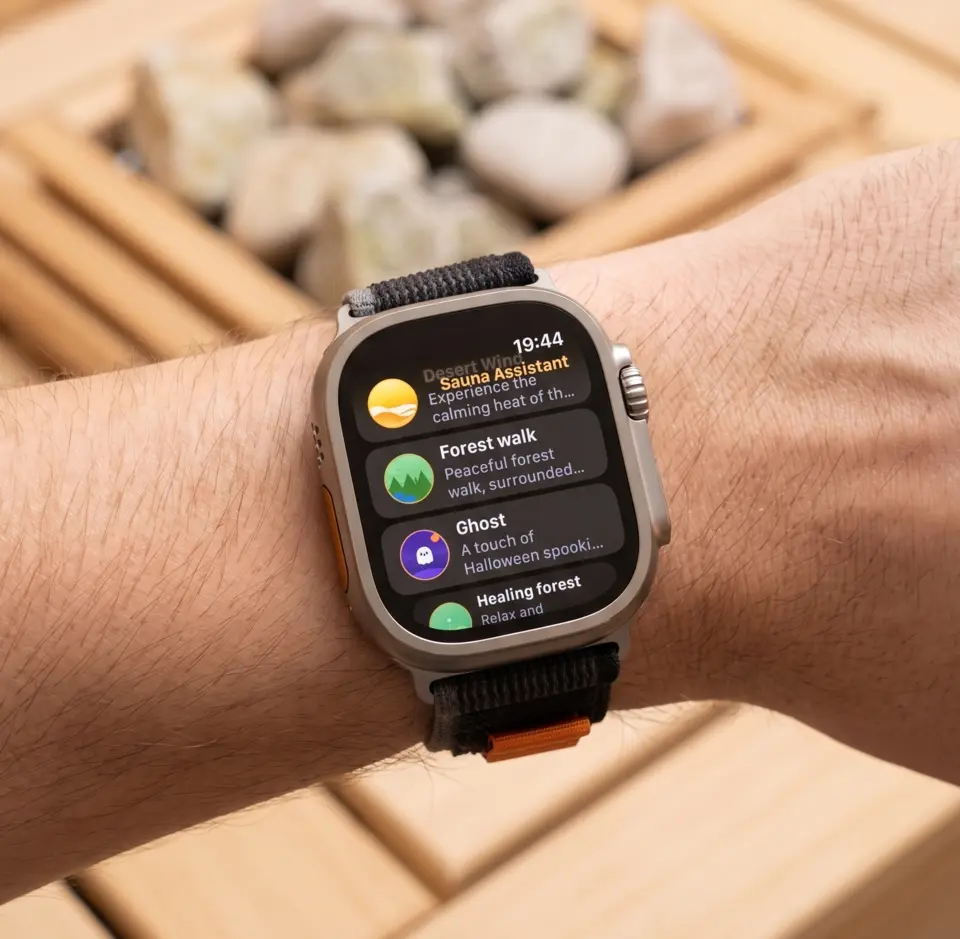
Sauna Assistant was built specifically for this, which is why it does not ask you to rename an Other workout.
From the watch alone, with your phone outside:
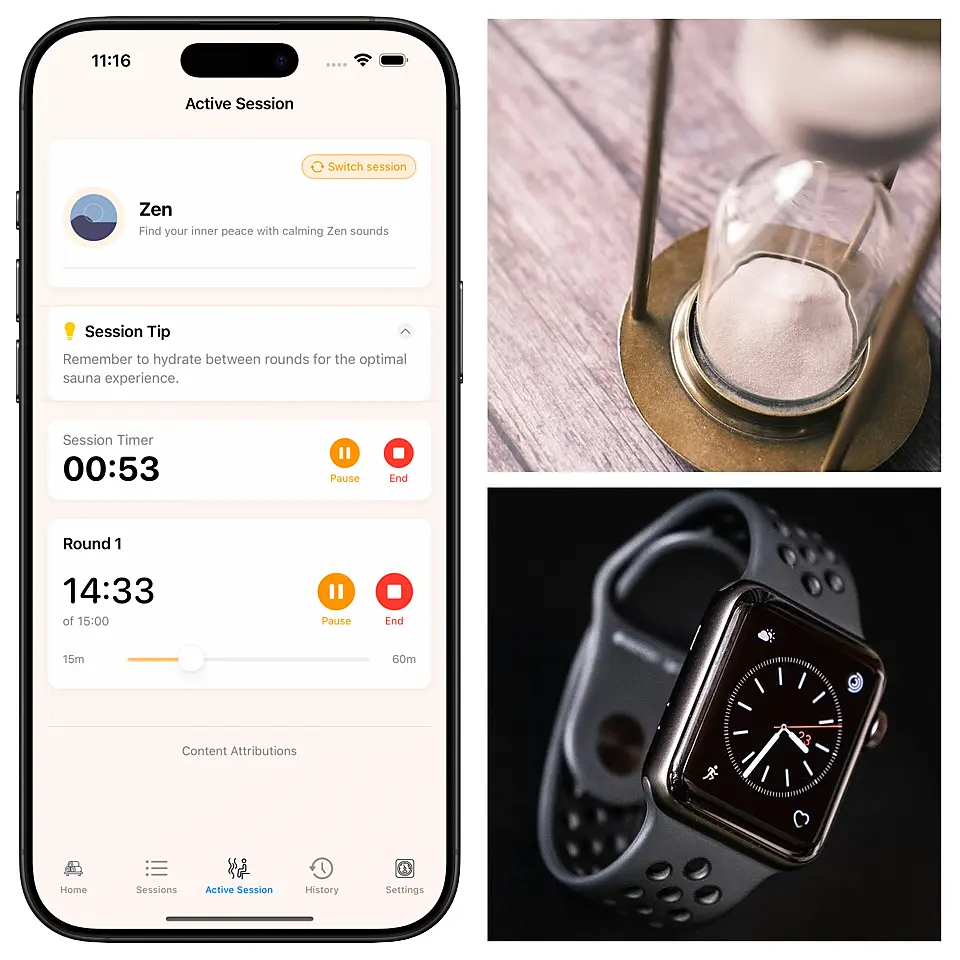
- Start, pause, resume and end sessions and individual rounds
- A live heart rate page: a chart of the session as it happens, with your lowest, average and highest BPM at a glance
- Per-round heart rate: every round and plunge listed with its own average, not one figure for the whole session
- Haptic cues for countdowns, round starts and round ends, so you can keep your eyes closed
- Cold plunges started and timed from the wrist, sharing one timeline with your sauna rounds rather than sitting in a separate list
On the iPhone side, sessions save with round-by-round detail, notes, and, if you have a compatible HomeKit sensor, the temperature and humidity each round actually ran at. Apple Health sync is optional: switch it on and each round is written as Mindful Minutes. When the watch is reading your heart rate, watchOS also needs a workout running, so the session is saved in Health as an Other workout too.
Forgot to start a session? Log a Session in the app’s history adds one after the fact: duration, rounds, temperature, humidity and cold plunges, typed in.
There is no account: sessions sync between your devices through your own private iCloud.
If you would rather try the timing side first without buying anything, the free browser-based sauna timer runs rounds and breaks on any device, offline, with the screen kept awake.
What About Garmin, Whoop and Oura?
Briefly, for context:
- Garmin has no native sauna activity either. The equivalent workaround is a custom activity profile, usually built on Cardio or Other, with the same calorie-inflation caveat.
- Whoop has no display, so live in-session feedback is not possible. It is a recovery device - useful for reading the aftermath of a session, not for pacing one.
- Oura sits directly against skin and is rated to a similar 35°C ambient. Most users wear rings through saunas without issue, but again, no live readout.
For real-time feedback on the wrist plus Apple Health integration, Apple Watch remains the most complete option - once you get past the missing workout type.
Frequently Asked Questions
Is there a sauna workout on Apple Watch?
No. Apple’s Workout app has no Sauna activity type. You can create a custom workout under the Other category and rename it Sauna, or use a third-party sauna app that writes properly labeled data to Apple Health.
How do I add sauna to my Apple Watch workouts?
Open the Workout app, scroll to the bottom and tap the plus button, turn the Digital Crown to Other, tap the three-dot button on the Other tile, then tap Custom and the plus button. Add at least one Work interval with a time goal, name it Sauna under Custom Title, and tap Create Workout. It then appears in your workout list.
Can you track sauna on Apple Watch?
Yes, but not with a built-in mode. You can start a custom workout named Sauna, use a sauna app that runs rounds and records heart rate, or add Mindful Minutes by hand in the Health app afterwards.
Is there a sauna setting on Apple Watch?
No. watchOS has no sauna mode or setting to switch on, and the watch cannot sense room temperature. Turn on Water Lock before you go in so steam and sweat do not register as taps.
Is sauna a workout on Apple Watch?
Not as Apple defines one. Sauna raises your heart rate through heat rather than muscular work, which is why a sauna logged as a workout shows inflated calories. Time and heart rate are worth keeping; calories and ring credit are not.
Are the calories from a sauna workout on Apple Watch accurate?
No. Apple Watch infers energy burn largely from heart rate. Heat raises your heart rate without corresponding muscular work, so a sauna session posts calorie figures far higher than the actual energy expenditure. Session time and heart rate are reliable; calories are not.
Can Apple Watch detect that I’m in a sauna?
No. Apple Watch has no ambient temperature sensor, so it cannot detect heat exposure or start tracking automatically. Any sauna session has to be started manually, whether through a custom workout or a dedicated app.
Should sauna sessions count toward my activity rings?
Ideally no. Logging sauna as a workout closes Exercise and Move rings without matching physical work, which distorts your training data over time. Recording sauna time as Mindful Minutes instead keeps the session in your health record without inflating your activity.